
Imagine you just created the perfect product. It solves a massive problem, looks incredible, and is priced better than the competition. But after launching it on Amazon, you wait for the sales to roll in—and all you hear are crickets.
🌟 Why does this happen? Because having a great product is only half the battle. If customers cannot find your product, or if your page does not convince them to buy, you will not make any money.
This is where Amazon listing optimization comes in.
In this easy-to-read guide, we will break down exactly how to optimize Amazon listings to rank higher on page one, attract more clicks, and turn visitors into paying customers. Whether you are a beginner or an experienced Amazon FBA seller, these simple steps will help you increase Amazon sales.
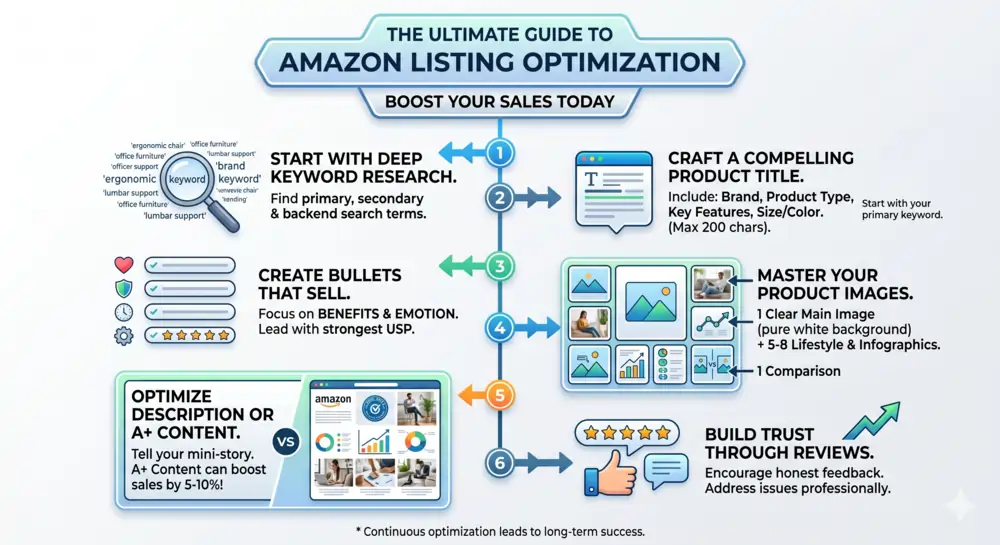
ℹ️ What is Amazon Listing Optimization?
Amazon listing optimization is the process of improving your product page so that it ranks high in Amazon search results and convinces shoppers to click the “Add to Cart” button.
Think of Amazon as a giant search engine, just like Google. When a customer types a high-intent keyword like “stainless steel water bottle,” Amazon’s algorithm (called A9) scans millions of products to show the best results.
Your goal is to tell Amazon exactly what your product is so that it shows your listing to the right people. At the same time, you are using AI SEO and smart writing to tell the human buyer why they need your product right now.
Step 1: Write a Winning Product Title
Your product title is the most important part of your Amazon SEO strategy. It tells both the search engine and the shopper exactly what you are selling.
If your title is too short, Amazon won’t know where to rank you. If it is stuffed with too many random words, shoppers will get confused and scroll past.
👉 How to write the perfect Amazon title:
- Start with your brand name.
- Add your main, high-intent keyword. (e.g., “Insulated Water Bottle”).
- Include the most important features. (Size, color, material).
- Keep it readable. Do not just paste a robotic list of keywords.
Title Comparison
| The Bad Title (Do Not Do This) | The Optimized Title (Do This) |
| Water Bottle Blue Metal Drink Gym | HydroPeak 32oz Insulated Water Bottle – Stainless Steel, Double Wall Vacuum, Leak-Proof Straw Lid (Ocean Blue) |
📢 Pro Tip: Put your absolute most important keywords in the first 50 to 80 characters of the title. This is because mobile phones will cut off long titles, and you want mobile shoppers to see what matters most!
Step 2: Craft Bullet Points that Sell
Once a customer clicks on your listing, they will usually look at your images and read your bullet points. Amazon gives you five bullet points to explain your product.
The biggest mistake sellers make here is writing boring technical facts. To create a high-converting Amazon listing, you need to turn your features into benefits.
A feature is what the product is. A benefit is what the product does for the customer.
- Feature: Made with 18/8 stainless steel.
- Benefit: Keeps your water ice-cold for 24 hours, so you can stay refreshed during long hikes in the hot sun.
📌 Rules for Great Bullet Points:
- Use ALL CAPS for the first few words to create a mini-headline.
- Answer common questions your buyers might have.
- Mention your product’s warranty or guarantee to build trust.
- Naturally sprinkle in secondary SEO keywords that didn’t fit in your title.
Step 3: Create a Persuasive Product Description
If the customer scrolls down to your product description, it means they are interested but need a little more convincing.
This is your chance to tell a story. Use simple English to explain how your product will improve their daily life. Break up long paragraphs into short, easy-to-read sentences.
If your brand is registered with Amazon, you can use A+ Content (formerly known as Enhanced Brand Content). This allows you to replace the boring text description with beautiful graphics, lifestyle photos, and comparison charts. Listings with A+ Content have a much higher conversion rate because they look professional and trustworthy.
Step 4: Use High-Quality Images (Visual SEO)
Humans are visual creatures. On Amazon, your pictures are your virtual packaging. Since shoppers cannot pick up and touch your item, your photos must answer all their questions.
To properly optimize your visual listing, you need a mix of different image types:
- The Hero Image (Main Image): This must be your product on a pure white background. It needs to be bright, clear, and take up 85% of the frame.
- Lifestyle Images: Show happy people actually using your product in real life. If you sell a dog leash, show a smiling person walking a cute dog in the park.
- Infographics: Use text on your images to point out key features. Show the exact dimensions, the materials used, or how easy it is to assemble.
Image Size Tip: Make sure your images are at least 1000 by 1000 pixels. This allows shoppers to use Amazon’s zoom feature to see the fine details of your product.
Step 5: Hidden Backend Keywords (The Secret Sauce)
Did you know there are keywords you can use that the customer will never see? In your Amazon Seller Central account, there is a section called “Search Terms” or backend keywords.
This is where you put extra words that are related to your product but did not fit naturally into your title or bullet points.
🧩 What to include in backend keywords:
- Common spelling mistakes (e.g., if you sell a “vacuum,” put “vaccuum”).
- Spanish translation words (if you sell in the US, many shoppers search in Spanish).
- Synonyms or slang terms for your item.
You have a strict limit of 250 bytes (which is roughly 250 characters) for this section. Do not repeat any words you already used in your title or bullet points; Amazon already knows you rank for those!
Step 6: Leverage AI SEO for Amazon
The world of e-commerce changes fast, and smart sellers are now using AI SEO to stay ahead of the competition.
Artificial Intelligence tools can help you write your listings faster and better. You can use tools like ChatGPT or specialized Amazon AI software to:
- Analyze thousands of customer reviews to find what people love (and hate) about your competitors’ products.
- Generate highly optimized bullet points based on your raw feature list.
- Discover hidden, high-intent keywords that human researchers might miss.
By combining human creativity with AI data, your Amazon listing optimization will be faster and far more accurate.
⭐ Final Thoughts: Optimization is an Ongoing Process
Amazon listing optimization is not a “set it and forget it” task. The best sellers constantly tweak their pages. They test new main images, update their keywords based on what is trending, and adjust their prices to stay competitive.
Take a close look at your current Amazon listing today. Are your images bright and clear? Does your title include high-intent keywords? Are your bullet points focusing on the benefits to the customer?
By following these simple steps, you will help Amazon understand your product, help customers fall in love with it, and ultimately boost your sales to the next level. Get optimizing, and watch your business grow!
🚀 Ready to Grow Your Amazon Business?
📞 Let’s discuss how we can help you achieve your e-commerce goals 📊
